Every booking system tells you who booked. Almost none of them tell you who nearly booked — the people who opened your page, read about a service, looked at the price of a prepaid plan, and then closed the tab. Those people are usually the most interesting ones you have, because they have already shown interest and simply have not been asked yet.
The new Statistics section in micali.online shows you exactly those people. It is available in every account, free of charge, like the rest of the platform.
What Statistics shows you
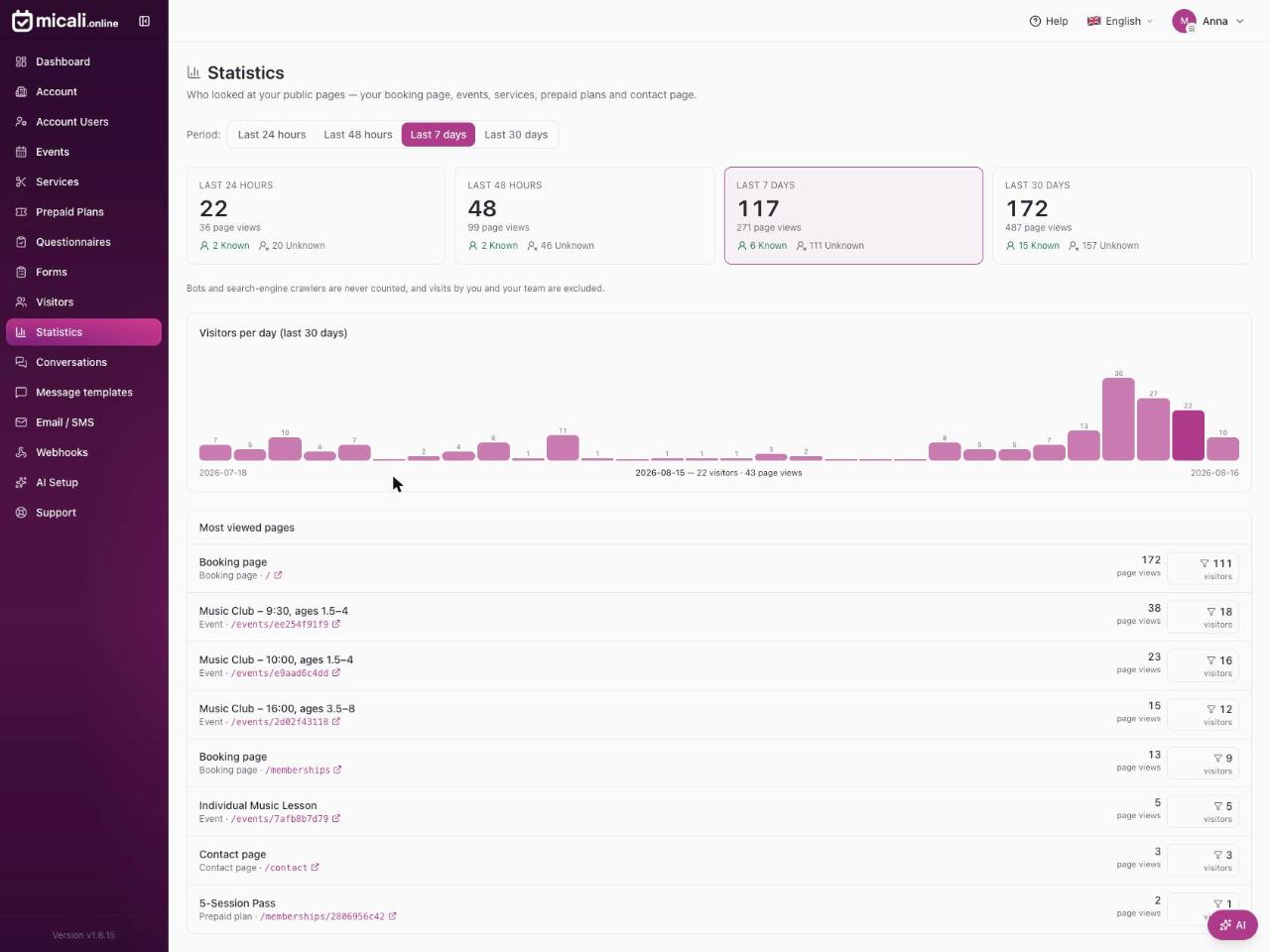
Statistics reports on your public pages — your booking page, individual events, services, prepaid plans and your contact page. Open the section and you see, for the last 24 hours, 48 hours, 7 days or 30 days:
- How many people visited, and how many pages they opened.
- How many of them you already know, and how many are still anonymous.
- A day-by-day chart of the last 30 days, so a poster, a Facebook post or a newsletter shows up as a visible spike.
- Which of your pages were viewed most, listed under their real names — Morning Yoga, not
/events/8c7394ba4b.
Known and unknown visitors
Visitors fall into two groups, and the difference matters.
Known visitors are people already in your visitor list — customers who have booked with you or signed in at some point. For them you see the name, the pages they went through and how long they spent on each one.
Unknown visitors are real people we cannot yet put a name to. You still see how many there are, what they looked at and where they came from, but nothing that identifies them personally.
One detail is worth understanding, because it is what makes the section useful rather than merely interesting: recognition works backwards in time. When somebody browses your pages anonymously today and books with you next week from the same browser, their earlier visits are connected to them once we recognise them. A wall of anonymous traffic gradually turns into a list of named customers.
The question that actually matters: who looked at this page?
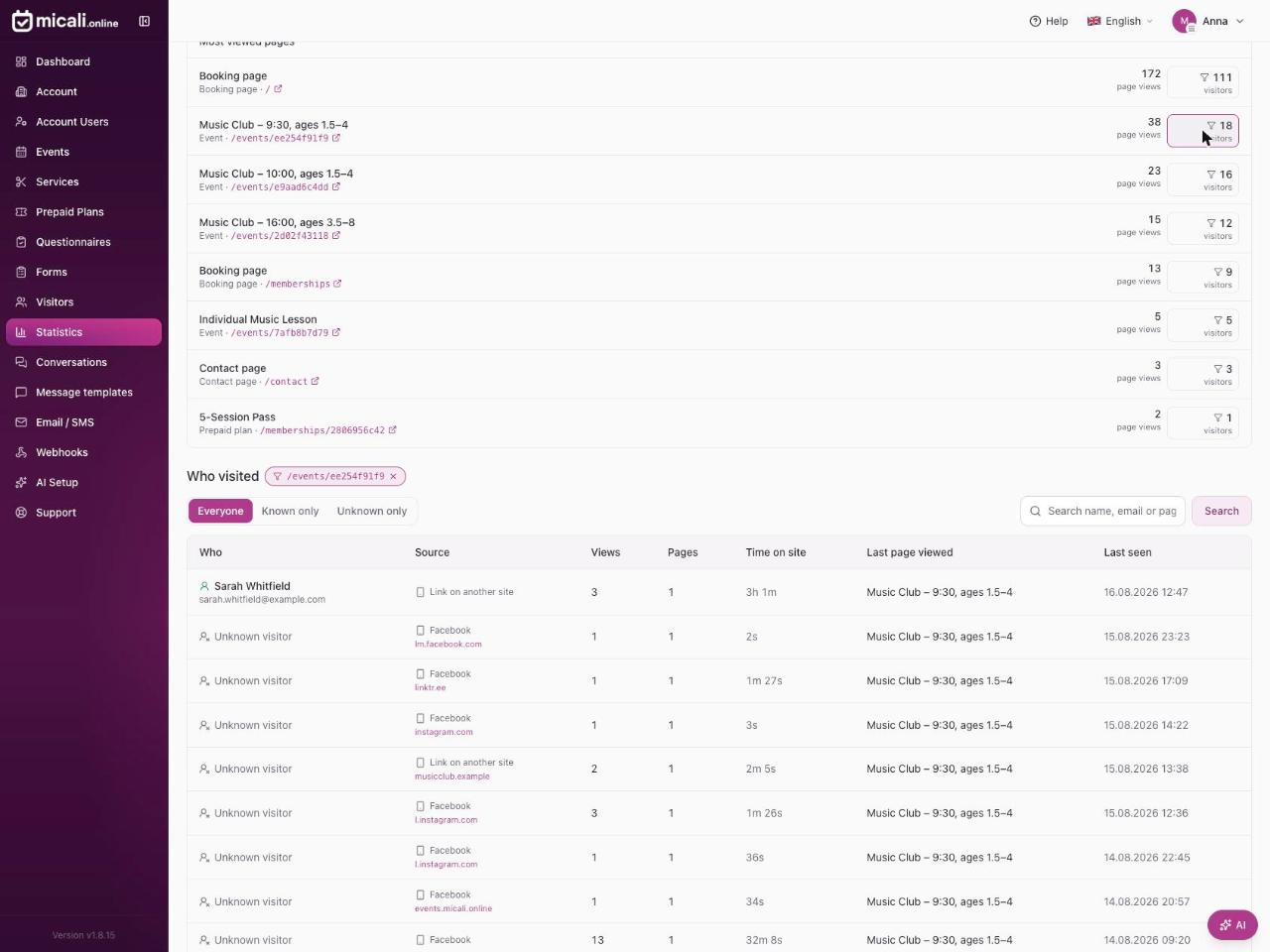
Every page in the "most viewed" list carries its own visitor count — and that number is a button. Press it, and the visitor list below is filtered to exactly the people who opened that one page.
This is where a page-view report becomes a working tool. If eight people viewed your 10-session pass last week and only two bought it, you now know who the other six are. They looked at the price, they thought about it, and nobody followed up. One short email is usually all it takes.
Where your visitors come from
Each visitor is shown with a source: a direct visit, or a link on another site. When somebody arrives from a Facebook post, a partner's website or a local directory, the referring site is named and linked, so you can see which of your channels genuinely brings people in — and which link you shared three weeks ago is still working.
What Statistics does not do
A feature that shows you who visited your pages has to be careful about what it shows, so a few things are deliberately excluded:
- Bots and search-engine crawlers are never counted. Every number you see is a real person.
- Your own team is excluded. Visits made by you and your colleagues while signed in as managers do not appear. On real accounts this was the single largest source of noise — refreshing your own event page all day would otherwise look like demand.
- Unknown visitors stay anonymous. No IP addresses, no browser fingerprints, no personal details. An unrecognised visitor is described by device type, source and language, and nothing more.
- Visitors of other businesses stay private. Somebody who is a customer of another account on micali.online, but not of yours, is anonymous to you. You only ever see the names of people who are in your visitor list.
Three ways to use it this week
- Follow up on interest that never converted. Open your most viewed service or prepaid plan, press its visitor count, and look at the known visitors who did not book. That is a warm list, not a cold one.
- Check what your promotion actually did. Post your event, then look at the daily chart and the source column two days later. You will see whether the traffic arrived, and from where.
- Fix the page nobody stays on. A page with many views and very little time spent is usually a page that does not answer the obvious questions — price, duration, what is included. That is a description problem, and it is quick to fix.
Where to find it
Statistics is in the left-hand menu of your account, between Visitors and Message templates. Every member of the account can open it, not only the owner.
You will not be starting from an empty page either: visits to public pages have been recorded since June, so your history is already there the first time you open the section.
Like everything else in micali.online, Statistics costs nothing — no plan to upgrade, no visitor limit, no add-on. If you already take bookings with micali.online, it is waiting for you in the menu.