Every micali.online account collects hundreds of numbers a month. Who looked at your booking page and where they came from. Who opened a time slot's details and never came back. Which slots filled up, which stayed empty, who didn't show up, and who booked five times in a row. You can see all these numbers in Statistics. But numbers alone won't tell you what to do with them on Monday morning, when you have a customer standing in front of you instead of a spreadsheet.
That's why we've added an AI advisor to micali.online. Roughly once a week, it goes through your account, crunches everything that happened in it over the past 30 days, compares it with the previous month and with other accounts on the platform, and sends you 3 to 5 concrete recommendations for getting more bookings. Every recommendation has the number behind it, the reason, the steps to take, and a link to the screen where you'll take the first one. In the app, you'll find it under Tips for your business.
In this article, we'll show you exactly what the advisor calculates, why there's real math behind every recommendation rather than a hunch, why a human reads every suggestion before it's sent, and what the recommendations look like that the first account owners have already received.
What the advisor sees
The advisor works with a 30-day window and an equally long window before it, so it can tell a blip from a trend. From your account, it builds a snapshot of eight areas:
- Traffic on your public page: how many people visited, where they came from (Facebook, Instagram, Google, direct link, paid ads), what device and language they used, and which page they landed on first.
- Booking funnel: how many people saw the list, how many opened the details of a time slot or service, how many started a booking, how many signed up, and how many completed the booking.
- Occupancy of every event and every time slot: empty slots, full slots, the average number of seats filled, and which day and hour of the week work best for you.
- Attendance and payments: who showed up, who didn't, how many bookings were left unmarked, and how many unpaid bookings you have in the next seven days.
- Visitors: who books repeatedly, who has never booked, who hasn't been in touch for 60 days, and who visits you regularly but doesn't have a prepaid plan.
- Prepaid Plans: what's expiring in the next two weeks, what ended without renewal, and what's waiting for approval.
- Communication: unanswered messages from visitors, failed emails, and the reminders and questionnaires you have set up.
- Profile: the length of your description, category, website, social media, contact details — in other words, what a visitor sees first.
How numbers become signals
Here's the core of the whole thing: your account's snapshot isn't read by an AI, but by a set of more than twenty deterministic detectors. Each one looks for one specific pattern, and when it finds it, it creates a signal along with the numbers that prove it. Here are a few examples of what's calculated under the hood:
Quick exits. Every time someone views the list, we measure how long they stayed on it. If they leave within ten seconds, we count it as a quick exit. When more than half of visitors leave that fast, the list didn't tell them why they should click further.
Step-by-step funnel. We track the move from a time slot's details to a started booking, to sign-up, and to completion. Each step has its own conversion rate. We also split visitors into those who came from paid ads and organic visitors, so we can see whether the ads are bringing in people who actually book, or just people who click.
Best and worst times of the week. Every time slot that took place is placed into a day of the week × hour cell, and for each cell we calculate the average number of seats filled. Cells with at least two slots get ranked, so the advisor can tell you that Thursday at 7:00 pm brings you an average of three filled seats, while Friday at 8:00 am brings none.
Empty slots and fill rate. For every event, we compare the number of time slots that took place with the number that stayed empty. If at least half of five or more slots stayed empty, that's a strong signal. If slots did fill up, but on average under 30% of capacity, that's a weaker signal with a different recommendation.
Last-minute bookings. From the gap between when a booking is made and when the slot starts, we calculate the average lead time. When more than 40% of people book less than 24 hours in advance, it makes sense to plan your reminders and promotion differently.
No-shows. From marked attendance, we calculate the share of people who booked and didn't show up. Above 20%, that's a signal that's usually tied to a missing reminder before the slot or a missing payment link.
The thresholds are deliberately conservative. A signal means "this is worth a sentence," not "this is statistically certain." And when there's too little data, a detector would rather stay silent than make a recommendation based on three visits.
Comparing against the whole platform
Most numbers mean nothing without a comparison. Is a 3% conversion rate from a time slot's details to a booking a bad result? You can't tell without knowing what everyone else achieves. That's why, on every run, the advisor recalculates platform-wide medians for the key ratios: quick exits from the list, single-page visits, the conversion from details to booking, slot fill rate, and the share of marked attendance. Only accounts with enough traffic are included in the medians, so new or barely used accounts don't skew them.
The comparison has one more consequence we take pride in. If your account has a weak conversion from details to booking, but the whole platform is just as weak, the problem isn't your slot's description. The problem is our booking page. A signal like that will never show up to you as a recommendation. Instead, it lands on our own team's desk as product feedback. So the advisor isn't only looking for what you can improve — it's also looking for what we need to improve.
Only aggregate medians ever enter the comparison. No account sees another account's numbers, and your recommendations contain only your own data. Other accounts appear in them only as a single figure: the median you're being compared against.
Where AI comes in, and where it doesn't
The language model in this system calculates nothing. It receives the account snapshot, the list of signals with their supporting numbers, and the platform medians, and its job is to turn that into a clear recommendation. The rules are strict: every recommendation must be grounded in one specific signal, it may only use numbers that actually exist in the snapshot, and it may only link to screens from an approved list. The model's output then goes through a check. A recommendation with no signal behind it, a made-up number, or a link outside the approved list gets discarded before anyone ever sees it.
Thanks to that, we can trace every sentence in a recommendation back to the number it came from. When the advisor writes that "373 people came from ads, and not one of them started a booking," that isn't an estimate. It's a line straight from your account's snapshot.
Every recommendation goes through a human
Even with strict rules in place, a model can still write a sentence that's numerically correct and yet tone-deaf. That's why every run of the advisor ends up as a draft that someone on our team reads. They can edit, approve, or reject each recommendation. Only approved recommendations get translated into your account's language and sent out. No one should have their morning class disrupted over auto-generated text that nobody read.
This step costs us time, but we don't want to skip it. micali.online is used by studios and businesses in 31 languages, and advice that's obvious for a yoga studio in Bratislava can be useless for a music school in Warsaw. Having a human in the loop is why we stand behind every recommendation.
What it looks like for you
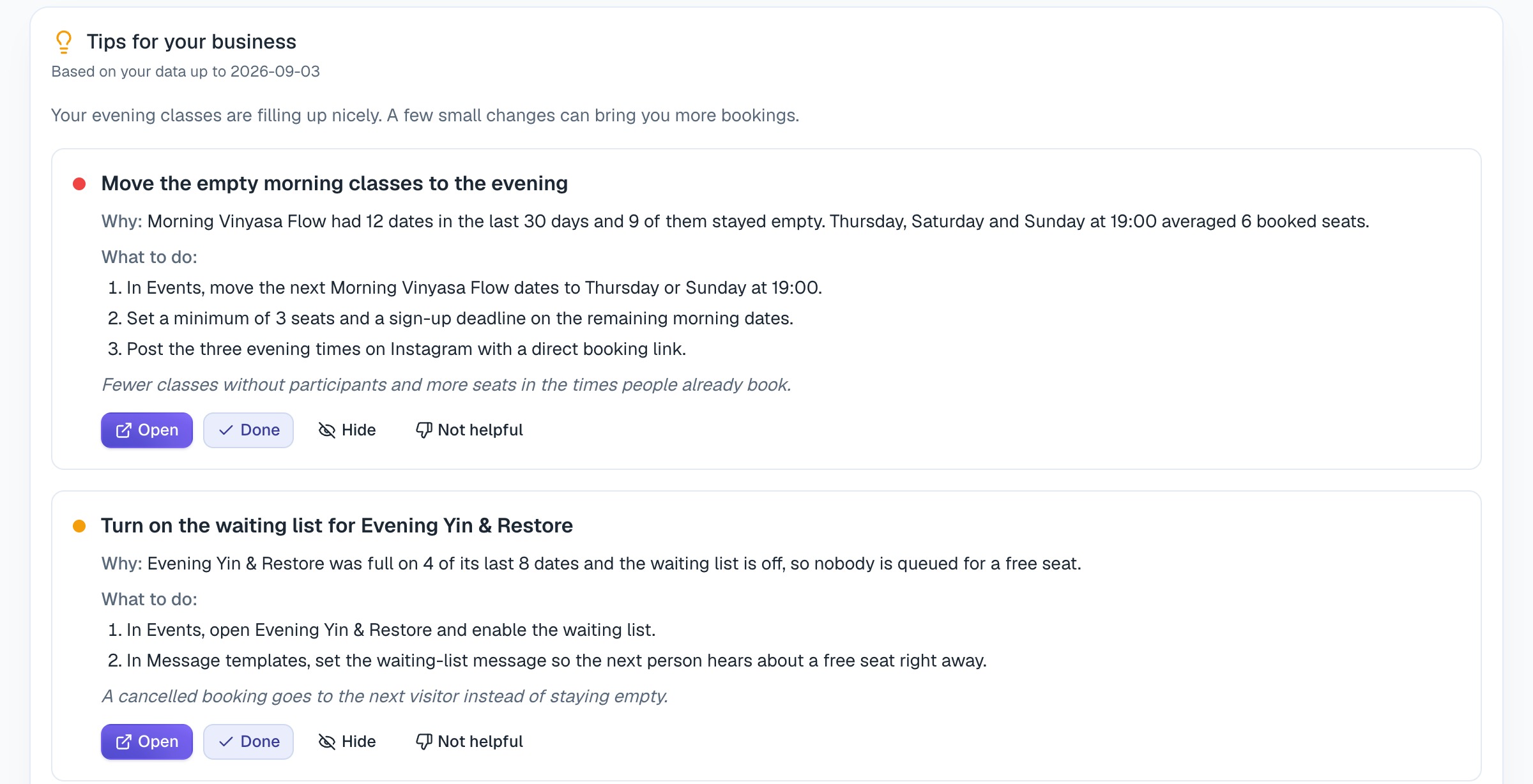
Once the recommendations are ready, account managers get an email and an in-app notification. A Tips for your business card appears on your account's main page. Every tip includes:
- a coloured dot for importance, ranging from informational to urgent, and green for a positive signal — when something is working and it's worth building on,
- Why: one to three sentences with the numbers that triggered the tip,
- What to do: two to four steps, both inside and outside the app — for example, which event to edit, who to email, or what to change in your ads,
- one sentence about what will actually improve,
- an Open button that takes you straight to the screen where you'll take the first step.
For every tip, you can click Done, Hide, or Not helpful. Handled tips disappear from the card, and your response comes back to us. A tip that owners mark as not helpful is a signal to us that we need to adjust the detector or the threshold — not to keep convincing you.
Six real-world examples
The following recommendations came out of the advisor's first runs. We've changed the account and event names; the numbers are real.
Ads that bring people, but not bookings. Over 30 days, 373 visitors came in from paid ads. Not one of them started a booking, and they viewed an average of 1.1 pages. Organic traffic brought in 181 people, 14 of whom signed up. Recommendation: pause the campaign that leads to the general list, and point the ads directly at a specific time slot, with its day, hour, and a "Book a spot" button. The first step is in Statistics, where you can see what the people from the ads actually did.
Morning slots nobody shows up to. A morning pilates class had 23 slots, and all 23 stayed empty. The same studio's evening class had 17 out of 21 empty, but the Thursday, Saturday, and Sunday 7:00 pm cells came out on top. Recommendation: move the morning slots to the evening, set a minimum capacity and a sign-up deadline on the remaining morning ones so a class with no interest doesn't run, and promote three specific evening times.
A time slot's details that lead nowhere. 467 people viewed an event's details, not one started a booking, and 14 signed up. That's 3% against a platform median of 14.3%. At the same time, three events had a short description or none at all. Recommendation: fill in the descriptions with who the class is for, what participants will get out of it, what they need to bring, and how booking works. Only then, share the link again.
Times that work call for more slots. Kids' classes on Tuesday at 10:00 am had an average of 8 seats filled, and Friday at 10:00 am had five. At the same time, the account had an 86% open rate out of 201 emails sent. Recommendation: add more Tuesday and Friday morning slots and announce them by email, which parents are clearly reading.
Full slots with no waiting list. Private lessons had three full slots and group lessons had two, and the waiting list was turned off for both. Recommendation: turn it on and set up a message template, so a spot freed up by a cancelled booking goes to the next person in line instead of staying empty.
People on the list who never booked. An account had 32 recorded visitors, 19 of whom never booked and 10 of whom booked repeatedly. Recommendation: build a mailing list from those 19 and send them a bulk email with a direct link to the nearest time slot, and reach out to the repeat visitors separately. Winning back an existing contact is cheaper than finding a new one.
And one bonus example that has nothing to do with math, only attentiveness: in one account, a message from a visitor had been waiting for 825 hours. The advisor flagged it as the most urgent signal of the week.
What the advisor isn't
It isn't a fortune teller. The advisor only sees what's in micali.online: bookings, public page traffic, attendance, messages. It doesn't see your revenue, your costs, or what's happening on the gym floor. When an account has too little data, the advisor would rather send two recommendations than five made-up ones. And if you don't agree with a tip, mark it Not helpful. The decision is always yours — the advisor is only there to make it easier.
How to turn it on
Like everything else in micali.online, the AI advisor comes at no extra charge. We're turning it on for accounts gradually, so we can properly review every first run. If you want tips for your account right now, message us through the Support section right in the app. Account managers receive the recommendations, usually once a week, always in the account's language. And if you feel the advisor missed something important, let us know — messages like that are exactly how new detectors get built.