Most no-shows aren't deliberate. People are busy, life gets in the way, and an appointment booked three weeks ago quietly slips off the radar. A well-timed, well-written reminder closes that gap — and the difference it makes to your calendar is hard to overstate.
The catch is that a good reminder takes a little thought: the right timing, the right channel, and wording that actually gets read and acted on. Do all three and you turn forgotten bookings into confirmed ones.
This is the complete reminder template library. We'll cover when to send, how to choose between email, SMS and a phone call, and what makes a reminder effective — then hand you 25+ copy-paste templates grouped by channel and use case, across salons, clinics, fitness, tutoring and more. Every template uses merge fields like {first_name}, {service} and {time} so you can drop them straight into your booking system.
Reminders work best when the rest of the booking flow is clear. If you are building that flow from scratch, start with the complete online booking setup guide.
Reminder timing: when to send
A single reminder helps. A short sequence of two or three, spaced sensibly, helps far more. The goal is to be present without being annoying — enough touchpoints that nobody forgets, not so many that you feel like spam.
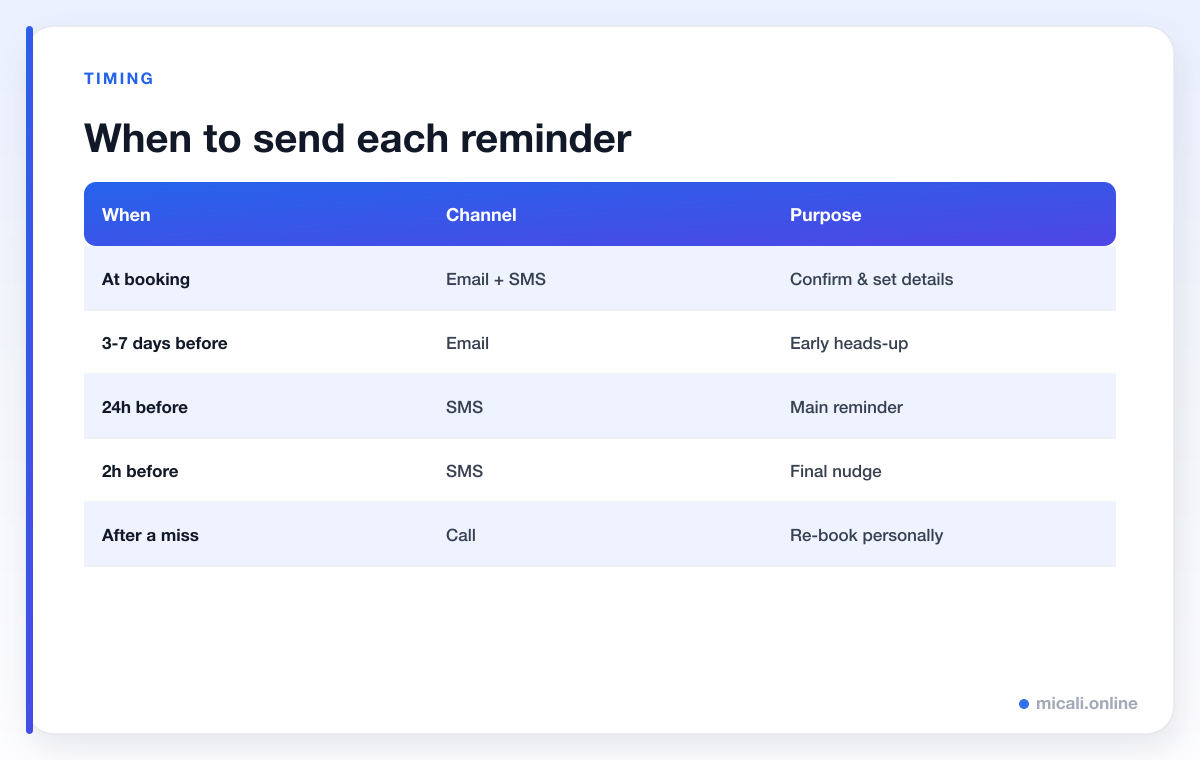
For most appointment-based businesses, the sweet spot looks like this:
- Confirmation at booking. Sent the instant someone books. It reassures them it worked and puts the details somewhere findable.
- 24 hours before. The main reminder. Far enough ahead that people can still rearrange their day, close enough that it stays top of mind.
- 2 hours before. A short final nudge on the day itself — especially valuable for first-time clients and busy mornings.
Longer or higher-value appointments can earn an extra early heads-up 3-7 days out. Use the schedule below as your default and adjust to your industry.
Choosing your channel: email vs SMS vs call
Each channel has a job. The best setup uses more than one.
Email is perfect for the booking confirmation and the early heads-up. It's free, carries all the detail — directions, prep notes, what to bring — and gives people an "add to calendar" link. The downside is that emails get buried, so don't rely on email alone for time-critical reminders.
SMS is the workhorse of no-show prevention. Texts are short, land straight on the phone and are usually read within minutes. Use SMS for the 24-hour reminder and the 2-hour nudge, keep them brief, and always include an opt-out. The only requirement is a mobile number, so make that field required on your booking form.
A phone call is the heavyweight. It's the most personal and the hardest to ignore, which makes it ideal for high-value appointments, first-timers, and re-booking someone after a miss. It doesn't scale, so reserve it for the moments that matter.
The anatomy of an effective reminder
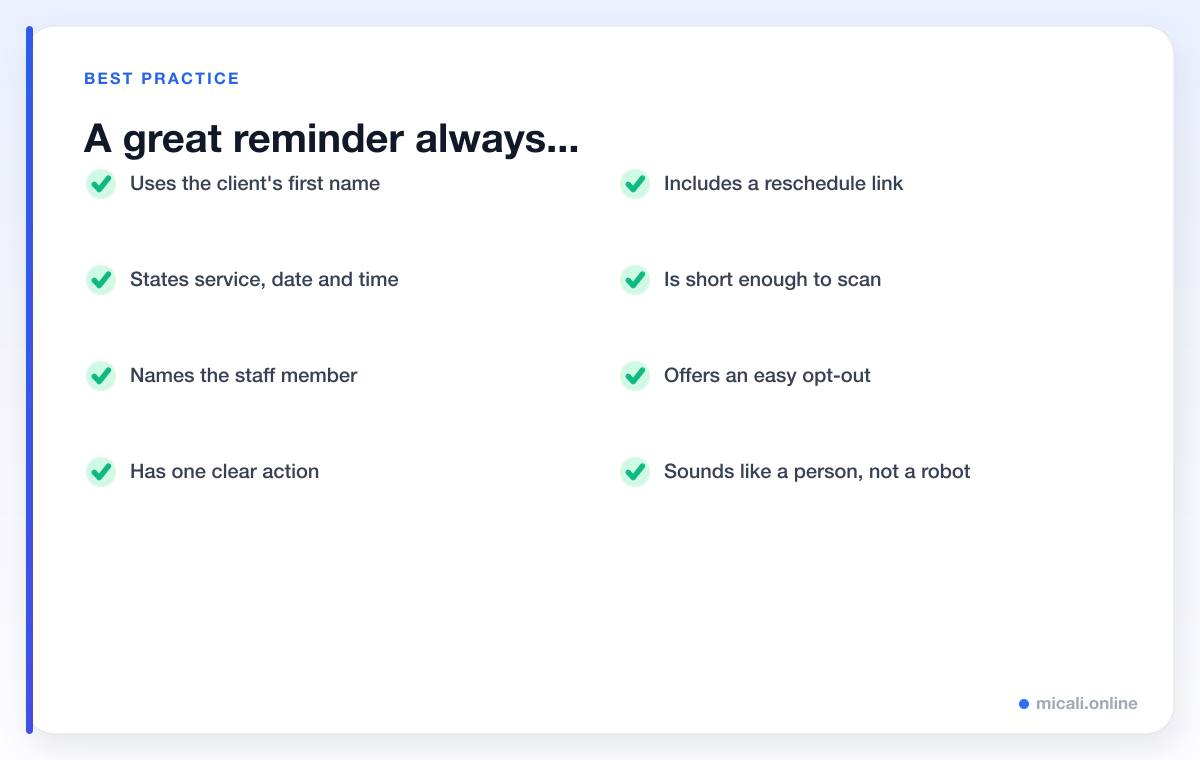
Whatever the channel, the strongest reminders share the same bones. Use the client's name, state the service, date and time, name the staff member where you can, and give one clear action — confirm, or reschedule with a link. Keep it short enough to read at a glance, and make it sound like it came from a person.
Here's the same skeleton as a reusable model email and text. Notice how little there is to it — clarity beats cleverness every time.


Email reminder templates
Email gives you room for detail, so use it for confirmations and the early heads-up. Keep the subject line specific and lead with the action.
1. Booking confirmation
Subject: You're booked in for {service} on {date}
Hi {first_name}, your appointment is confirmed. {service} with {staff} on {date} at {time} at {business}. Need to make a change? Manage your booking here: {manage_link}. See you soon!
2. Early heads-up (3-7 days before)
Subject: Your {service} is coming up on {date}
Hi {first_name}, just a friendly heads-up that your {service} with {staff} is on {date} at {time}. Everything still suit you? You can confirm or reschedule in one tap: {manage_link}.
3. 24-hour email reminder
Subject: Reminder: {service} tomorrow at {time}
Hi {first_name}, this is a reminder that your {service} with {staff} is tomorrow, {date}, at {time}. If you need to move it, no problem at all: {manage_link}. We're looking forward to seeing you at {business}.
4. Reschedule made easy
Subject: Need to change your {service}?
Hi {first_name}, plans change — we get it. If {date} at {time} no longer works, you can pick a new slot in seconds here: {manage_link}. No need to call or explain.
5. Prep / what to bring
Subject: Getting ready for your {service}
Hi {first_name}, your {service} with {staff} is on {date} at {time}. To get the most from it, please arrive 5 minutes early and bring any relevant details. Questions before then? Just reply to this email.
6. New-client welcome reminder
Subject: Looking forward to meeting you, {first_name}
Hi {first_name}, we can't wait to welcome you for your first {service} on {date} at {time}. You'll find us at {business} — arrive a few minutes early and {staff} will take it from there. Need directions or to reschedule? {manage_link}.
SMS reminder templates
Texts should be short, specific and end with one action. Include an opt-out ("Reply STOP to opt out") on automated messages where your region requires it.
7. Standard 24-hour SMS
Hi {first_name}! Reminder: your {service} is tomorrow at {time} with {staff} at {business}. Reply Y to confirm or tap to reschedule: {manage_link}
8. Confirm-by-reply SMS
{business}: Hi {first_name}, your {service} is on {date} at {time}. Reply Y to confirm or N to cancel. Thanks!
9. Short and friendly
Hey {first_name}, see you tomorrow at {time} for your {service}! Need to change it? {manage_link} — {business}
10. Booking confirmation SMS
Hi {first_name}, you're booked! {service} on {date} at {time} with {staff}. Manage your booking: {manage_link}. See you at {business}.
11. Reschedule nudge SMS
Hi {first_name}, we haven't heard back about your {service} on {date}. Still good to go? Confirm or move it here: {manage_link} — {business}
Final-hour nudge templates
A short message a couple of hours before the appointment catches the people who confirmed days ago and then got swept up in their day. Keep these ultra-brief.
12. 2-hour nudge
See you soon, {first_name}! Your {service} with {staff} is at {time} today. We're at {business} — running late? Let us know: {manage_link}
13. Same-morning nudge
Good morning {first_name}! Just a reminder your {service} is today at {time}. Looking forward to seeing you — {business}.
14. Directions + nudge
Hi {first_name}, your {service} is at {time} today at {business}. Tap for directions and parking: {manage_link}. See you shortly!
Deposit & payment reminder templates
Where you take a deposit or hold a card, a gentle reminder protects both sides. Keep the tone warm and matter-of-fact — never accusatory.
15. Deposit due (email)
Subject: Secure your {service} on {date}
Hi {first_name}, to confirm your {service} with {staff} on {date} at {time}, please complete your deposit here: {manage_link}. Your slot is held for 24 hours.
16. Balance reminder (SMS)
Hi {first_name}, a quick reminder that the balance for your {service} on {date} can be paid in advance or on the day. Manage payment: {manage_link} — {business}
17. Card-on-file / no-show policy reminder
Hi {first_name}, reminder: your {service} is on {date} at {time}. As a heads-up, cancellations within 24 hours may incur a fee. Need to reschedule? {manage_link} — {business}
18. Payment received (reassurance)
Subject: Payment received — you're all set
Hi {first_name}, thanks! Your deposit for {service} on {date} at {time} is confirmed. See you at {business}. Manage your booking any time: {manage_link}.
Class & group reminder templates
Classes and group events have their own rhythm — spots are limited and a no-show keeps someone off the waiting list. Reference the class name and start time clearly.
19. Class reminder (SMS)
Hi {first_name}! Reminder: {service} is tomorrow at {time} with {staff}. Can't make it? Free up your spot here: {manage_link} — {business}
20. Waiting-list spot available
Good news {first_name}! A spot has opened for {service} on {date} at {time}. Grab it before it's gone: {manage_link} — {business}
21. Bring-a-friend / group prep (email)
Subject: Get ready for {service} on {date}
Hi {first_name}, your {service} with {staff} is on {date} at {time}. Please arrive 10 minutes early to settle in, and bring water and comfortable kit. Need to swap classes? {manage_link}.
22. Membership session reminder
Hi {first_name}, you're booked into {service} on {date} at {time}. This uses one session from your membership. Manage or cancel (free up to 12h before): {manage_link} — {business}
Phone call scripts
For high-value bookings, first-timers, or re-booking after a missed appointment, a quick call is unbeatable. Keep it warm, brief and helpful — you're confirming, not chasing.
23. Confirmation call
"Hi {first_name}, it's {staff} from {business}. I'm just calling to confirm your {service} on {date} at {time}. Does that still work for you? ... Wonderful, we'll see you then. If anything changes, just give us a ring or use the link in your email."
24. Voicemail version
"Hi {first_name}, this is {staff} from {business} confirming your {service} on {date} at {time}. No need to call back unless you'd like to change it — you can also reschedule online any time. See you soon!"
25. Re-booking after a no-show
"Hi {first_name}, it's {staff} from {business}. We missed you for your {service} — everything okay? I'd love to get you back in. I have a slot on {date} at {time}; would that suit?"
26. First-time-client welcome call
"Hi {first_name}, it's {staff} from {business} — thank you for booking your first {service} with us on {date} at {time}. I just wanted to say hello and check whether you have any questions before your visit."
How micali.online sends these for you
Writing great reminders is only half the job — the other half is sending them reliably, every time, without you lifting a finger. micali.online sends automated email and SMS reminders on the schedule you choose, with merge fields filled in from each booking, plus instant confirmations, one-tap rescheduling, deposits and a built-in waiting list.
You can store these templates once and let them run in the background, so every client gets a timely, personal reminder while you get on with the work. For more wording, browse our templates library or our automation guides.
Frequently asked questions
How many appointment reminders should I send?
Two to three is the sweet spot for most businesses: a confirmation when the client books, a reminder 24 hours before, and a short nudge a couple of hours before. Longer or higher-value appointments can take an extra heads-up 3-7 days out.
Should I use email or SMS for reminders?
Use both. Email is ideal for the detailed booking confirmation and an early heads-up; SMS is best for time-critical reminders because texts are read quickly. For high-value or first-time appointments, add a phone call.
What should an appointment reminder include?
The client's name, the service, the date and time, the staff member where relevant, and one clear action — confirm or reschedule with a link. Keep it short and friendly so it's easy to scan on a phone.
How do I personalise reminders at scale?
Use merge fields like {first_name}, {service}, {date}, {time}, {staff} and {manage_link}. Your booking software fills them in automatically for each client, so every message feels personal without any manual work.
When should I send the reminder for a same-day booking?
Send the confirmation immediately, then a single short nudge a couple of hours before the appointment. There's no need for a 24-hour reminder when the booking is already for today.
The bottom line
A reminder is a tiny message that does an enormous job. Get the timing right, pick the channel that fits the moment, keep the wording short and human, and you'll watch forgotten bookings turn into confirmed ones. Copy the templates above, tweak them to sound like you, and you're set.
Want it all on autopilot? Create your free micali.online booking page — no credit card needed — and start sending automated, personalised reminders today.